

Make. Train. Code.
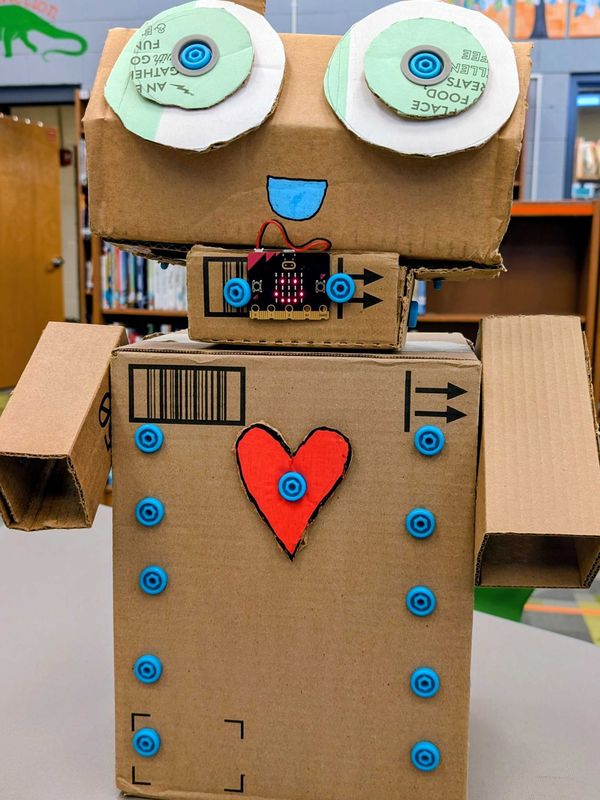
In this Physical AI design challenge, hands-on cardboard construction meets high-tech machine learning and coding. Acting as robot designers, students will design and create their own cardboard robot toy while exploring how to use Makedo Scrus and cardboard to create a holder for micro:bit and a battery pack. Next, students will use the micro:bit AI Storytelling Friend lesson to explore machine learning and train their own ML models with micro:bit’s CreateAI. Finally, they’ll code their newly trained micro:bit brain with Microsoft MakeCode to build their own working cardboard robot toy!
Subjects
Design and Technologies, Engineering and Design, English Language Arts
Objectives



Preparation
Materials
Makedo Invent Kit
Upcycled Cardboard
1x micro:bit per pair of students
Computer (e.g. desktop, laptop, or Chromebook) with access to the micro:bit CreateAI website and MakeCode website, using a Chrome or Edge web browser
AI Storytelling Friend lesson on machine learning, training models, and Microsoft Make:Code
Optional: 3D printed holder (STL files available on 3D Printables and Makedo Maker Tip)
Unsure of which cardboard to use? Read our guide here.
Activity
The Design Challenge
Pose the following scenario:
Robots are no longer just science fiction; they are tools we can build and train ourselves! As a robot designer and AI trainer, you already know this! Your challenge is to use cardboard, Makedo tools, and a micro:bit to design your own cardboard robot toy and bring it to life using machine learning and coding.
Your Goal: Use Makedo tools and connectors with upcycled cardboard to design and build a robot toy that houses a micro:bit and a battery pack, then train and code the micro:bit brain using CreateAI and Microsoft MakeCode.
Your Role: You are a robot designer and AI trainer tasked with creating a cardboard robot toy that can, using machine learning, think about how to respond after certain actions are performed.
Your Audience: Your robot toy should be designed for anyone who wants to interact with an AI-powered expressive robot. That could mean a classmate, a younger student, or even yourself!
The Scenario: Your challenge is to build a robot toy that is not only structurally sound, but smart, using machine learning to train the micro:bit as its brain, along with MakeCode to give it an individual personality.
The Product: A cardboard robot toy built with Makedo tools that includes a secure Scru-built or 3D printed holder for the micro:bit, a hidden but accessible battery pack, and a trained AI model that brings your robot to life!
Reflection
Journal Prompts
Where did you choose to place the micro:bit on your robot, and why did that location make sense for your design?
What was the trickiest part of securing the battery pack so it was hidden but still accessible? How did you solve it?
If you could rebuild your robot, what would you change about its structure or design?
What data did you use to train your robot's AI model, and how did you decide what to include?
How did your robot's responses change as you added more training data?
What surprised you about how the machine learning model worked?
Machine learning models are only as good as the data they're trained on. What are some limitations of your robot's training?
Facilitation Tips
Help Students Dive Deeper
Observe students as they build and ask them about their design choices. Ask things like, “Why did you place the micro:bit where you did?” and “How are you making your battery pack accessible?”
During the machine learning phase using CreateAI, ask students to explain why collecting varied data samples improves their model’s accuracy.
Once coding is complete, have students demonstrate their robot to a partner or the class and explain how their physical design and code work together to tell a story or give their cardboard robot toy expressions.
Click the button below to see a real-life Classroom Snapshot from this design challenge.
Extensions
Take It Further
Ask students to write a backstory for their robot. Where does it come from? What does it care about?
Have students create a robot manual or packaging insert for their toy as if it were a real product being sold.
Host a robot showcase where students introduce their robot to the class in character, as if they were presenting a new product at a tech expo.
Further Resources
Alignment to Standards
These standards are highly relevant to this activity. For a complete list, please refer to the framework websites. This list can be tailored for your class.